
An ABA PayWay integration for an ecommerce site comes down to one of three builds: the direct Purchase API, the official WooCommerce plugin, or the official Shopify app. The checkout itself is the part least likely to go wrong. Pick the wrong path for how the business actually operates and the pain shows up later: in a refund nobody can reconcile, in a card the integration cannot save for next time, or in a go-live date that slips because nobody emailed ABA's sales team soon enough.
This guide walks through what each path requires, where the documentation leaves real gaps, and what changed when ABA PayWay became a listed Shopify gateway in 2025. For the wider market behind these numbers, our guide to ecommerce in Cambodia covers the platforms and payment habits Cambodian shoppers already use.
What Are the Three Ways to Build an ABA PayWay Integration?
An ABA PayWay integration can be built three ways: a direct Purchase API call from the site's own backend, the official WooCommerce plugin, or the official Shopify app. All three route a buyer to the same payment methods, cards, ABA KHQR, WeChat Pay and Alipay among them, but they differ in who writes code, who needs a sandbox first, and what the store can do after the sale closes.
How Does ABA PayWay's Direct API Work for a Custom Integration?
ABA PayWay's direct API, the Purchase endpoint, works by having the website's own backend assemble the transaction details, sign them, and send them to PayWay, which returns either a hosted checkout page, a popup, or a bottom sheet depending on the integration option chosen (ABA PayWay developer documentation, accessed October 2026). The request carries a UTC timestamp, a merchant ID of up to 30 characters, and a transaction ID of up to 20 characters that must be unique: PayWay rejects a duplicate outright, which matters for any retry logic a developer writes.
Every request is signed with a hash, a Base64-encoded HMAC-SHA512 of the concatenated fields using the merchant's API key, the same signature scheme that protects the callback PayWay sends back once a customer pays. A few easy-to-miss constraints: amounts in Cambodian riel cannot carry decimals and must be at least 100 KHR, a single transaction supports a maximum of 50 line items, and a checkout session defaults to a 30-day lifetime, configurable as low as 3 minutes for an impulse purchase. Pre-authorization, holding funds without capturing them immediately, only works through ABA Pay, KHQR, or cards, not the wallet options.
That technical depth explains why a direct integration exists at all: it is the only path that offers pre-authorization and account-on-file card tokenization.
What Does the WooCommerce Plugin Handle, and What Does It Leave to You?
The WooCommerce plugin handles the Purchase API's hashing, redirect and callback logic automatically for a WordPress store, once a merchant registers for a sandbox account and enters a Merchant ID and API Key into the plugin's settings page (ABA PayWay WooCommerce integration guide, accessed October 2026). Installation itself is a standard WordPress plugin install-and-activate. ABA requires the current WordPress and WooCommerce versions, specifically "the latest 3 versions" of each, worth checking before a store on an older theme stack assumes the plugin will simply drop in.
Two limits matter. First, sandbox testing does not unlock production on its own: going live means contacting ABA's E-Merchant Acquisition team directly by email, and ABA states plainly that while "all payment methods are available for testing in sandbox mode," for live payments "only the options you've agreed upon with our sales team will be available" (ABA PayWay WooCommerce integration guide). Second, and this is the one most stores discover the hard way, a refund issued through the ABA Merchant Portal does not reflect back in the WooCommerce order record. The store's own system still shows the order as paid in full until someone updates it by hand, turning every refund into a two-system reconciliation task.
What Changed When ABA PayWay Became Cambodia's First Bank Gateway on Shopify?
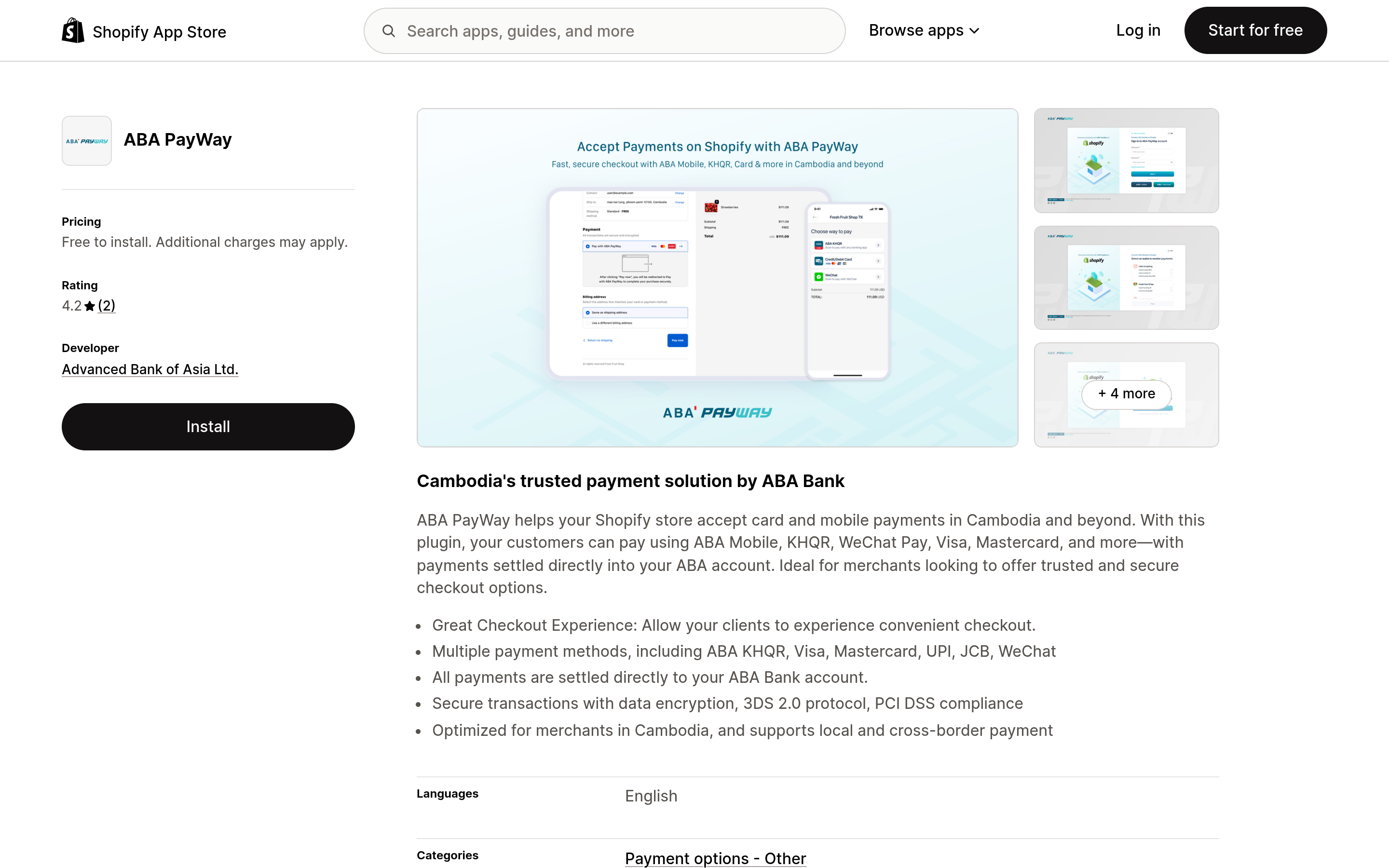
ABA PayWay became the first bank-backed payment gateway on the Shopify App Store in Cambodia, with the partnership announced on 21 October 2025, after the app itself had already been listed since August of that year (Cambodia Investment Review, October 2025). The app supports ABA KHQR, ABA Pay, Visa, Mastercard, WeChat Pay, UnionPay and JCB, settling directly into the merchant's ABA Bank account.
"It opens the door for entrepreneurs and SMEs to sell online more professionally, efficiently, and securely, both locally and internationally."
Zokhir Rasulov, Chief Digital Officer, ABA Bank (Cambodia Investment Review, October 2025)
The onboarding model is genuinely different from WooCommerce's. A Shopify merchant connects an existing ABA Merchant Portal login, picks a business profile if they run more than one outlet, and tests transactions directly in the live store through a Test Mode toggle, no separate sandbox required. Refunds carry the same gap as WooCommerce: processed manually in the Merchant Portal, with no automatic sync back to Shopify's order record, and settlement timing varies by payment method. As of this writing the app carries a 4.2 out of 5 rating from only two reviews, too small a sample to call a verdict, but one reviewer's complaint is specific and telling: the gateway "works flawlessly," they wrote, but the store still has no native integration for Shopify POS, forcing manual entry for any sale made in person. A Phnom Penh brand running a physical counter alongside its Shopify store should plan for that gap now, not discover it at the till.
The Three Paths, Compared
Put side by side, the three paths do not differ much at checkout. They differ in what a store can do before and after the sale.
| Path | Needs a developer | Needs a sandbox first | Card tokenization or pre-auth | Refunds sync automatically |
|---|---|---|---|---|
| Purchase API (direct) | Yes | Yes | Yes, via the API or the unofficial payway-js SDK | Yes, through the Refund Transaction call |
| WooCommerce plugin | No, install and configure | Yes, sandbox account before going live | No, checkout only | No, manual in the Merchant Portal |
| Shopify app | No, install and connect | No, Test Mode runs inside the live store | No, checkout only | No, manual in the Merchant Portal |
The unofficial Node.js client payway-js packages the direct API's full range, transactions, refunds, pre-authorization, account-on-file and card-on-file, plus payment links, into a few function calls (GitHub, seanghay/payway-js). Its own documentation states plainly that it is "not a product of ABA Bank," the right amount of caution: a faster starting point for a custom build, not a substitute for testing every edge case against ABA's own API.
Should a Growing Cambodian Store Build Its Own Integration or Use a Plugin?
A growing Cambodian store should default to the WooCommerce or Shopify plugin until a specific feature, usually a saved card for repeat customers or a pre-authorized hold, genuinely requires the direct Purchase API. Most catalogue stores never need either.
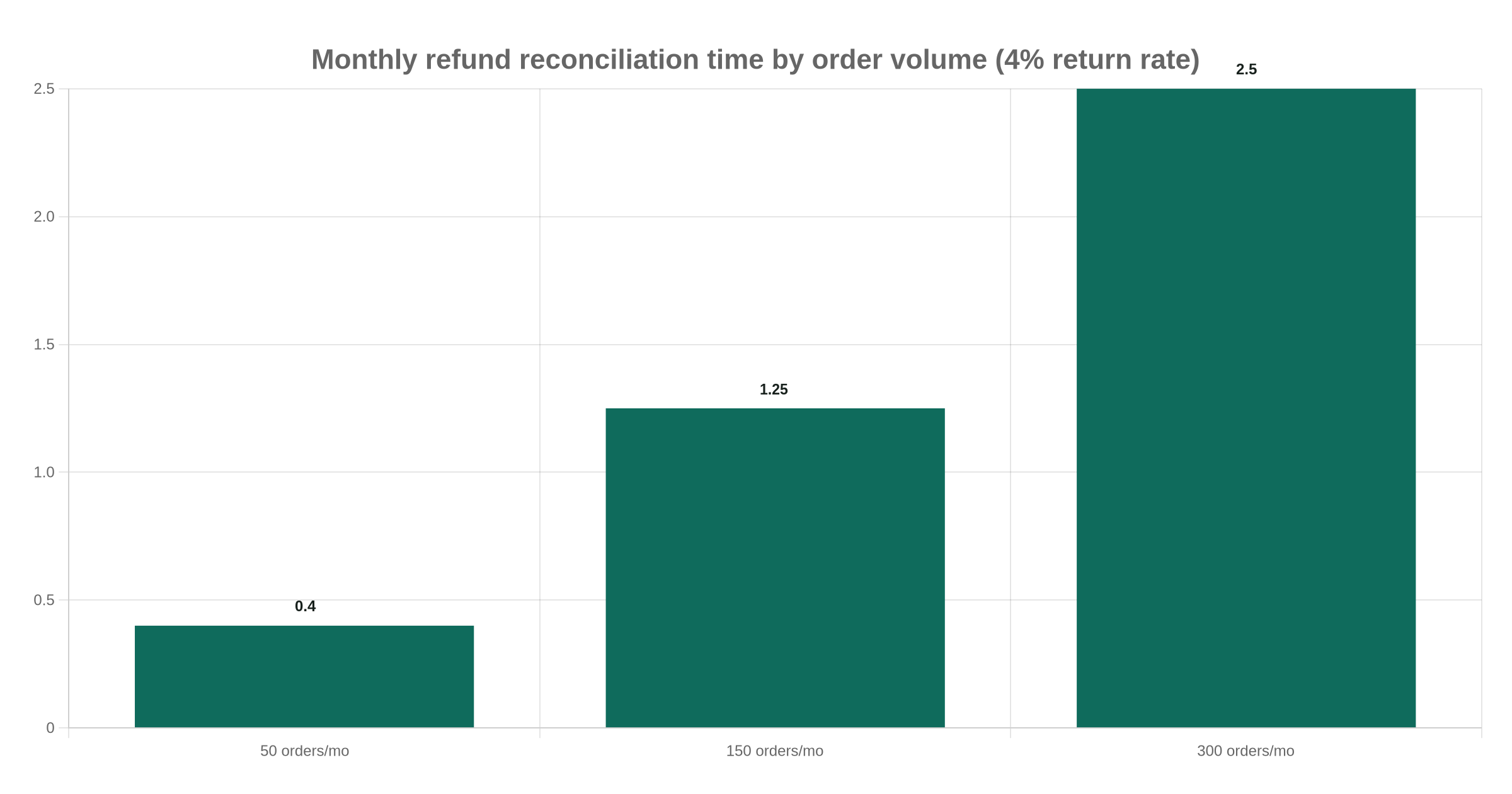
Run the refund gap through real numbers. A Phnom Penh homeware brand on Shopify doing 150 orders a month at a typical 4% return rate sees about 6 refunds monthly. Each one, processed in the Merchant Portal then checked by hand against Shopify's order list, costs roughly 10 to 15 minutes of staff time once mistakes and double-checking are counted: over an hour a month on reconciliation a direct integration's Refund Transaction call would close automatically. Not large enough to justify an engineering project on its own, but it compounds with every return policy the store adds, and scales with volume rather than staying fixed.
Short of that story, the order we check first is the return policy, not the platform: a store that already promises a saved card at checkout has justified the API's maintenance cost before a line of it is written.
A third scenario shows the same pattern from the WooCommerce side, before a single transaction even runs. A Siem Reap gift shop still on WordPress 6.1, with a theme last updated two years ago, would fail ABA's own compatibility rule on day one, since the plugin requires the latest three versions of both WordPress and WooCommerce. Catching that gap during the sandbox request costs an afternoon of updates and re-testing. Catching it the week ABA's sales team finally answers the go-live email costs a launch date.
A custom ecommerce build we ship out of Phnom Penh treats this as a volume and feature question, not a technical difficulty one: the Purchase API is not hard to implement, it is a cost center to maintain, since the store becomes responsible for its own webhook signature verification and its own handling of every PayWay error code. A plugin trades that ownership for a sales-team gate on go-live. Both are reasonable choices. Picking blind is not.
Our Recommendation, and the Question ABA Hasn't Answered
The open question is whether ABA will close the Shopify POS gap a merchant already flagged publicly: a store selling both online and at a physical counter in Phnom Penh currently has to run two separate reconciliation habits, one automatic, one manual, for the same ABA Bank account. Until that changes, a hybrid retailer should budget for it explicitly rather than assume PayWay's online success means the same experience applies at the till.
Our recommendation: start with the official plugin for whichever platform is already in use, and only move to the direct Purchase API once a feature like saved cards, subscriptions, or pre-authorized deposits is actually on the roadmap, not hypothetically useful someday. Budget staff time for manual refund reconciliation either way, since neither plugin syncs automatically. If the project needs that gap scoped against a specific catalogue and order volume, a scoped estimate tied to our ecommerce development work is the next step, alongside recent project work; our KHQR payments and Bakong volume pieces cover the payment side.
Prefer to chat? Message our founder directly on Telegram (@maxgrolier), or book a call with the team.
Frequently asked questions
Do I need a developer to add ABA PayWay to my store?
Only for the direct Purchase API. The WooCommerce plugin and the Shopify app install and configure without writing code, though a WooCommerce store still needs someone to enter a Merchant ID and API Key and switch off the sandbox toggle before going live.
Can I test ABA PayWay without a live bank account?
Yes, on WooCommerce, through a separate sandbox account and sandbox API keys requested from ABA. On Shopify there is no separate sandbox: Test Mode runs test transactions directly inside the live store using the merchant's existing Merchant Portal login.
Does ABA PayWay support recurring or subscription billing?
Only through the direct Purchase API's account-on-file and card-on-file features, which store a payment method for future charges. Neither the WooCommerce plugin nor the Shopify app exposes that; both are built for one-off checkout.
Why doesn't a refund show up in my store after I process it with ABA?
Because refunds issued through the ABA Merchant Portal do not sync back to WooCommerce or Shopify automatically. The store's order record keeps showing the original payment until someone updates it by hand, except on a custom integration using the Refund Transaction API call.
Is the unofficial payway-js library safe to use in production?
It is maintained outside ABA Bank, which its own repository states plainly. It is a reasonable starting point since it already wraps the full API surface, but a team adopting it should still test every transaction and error path against ABA's own documentation, and should not assume future API compatibility.