

On a Monday morning in Tuol Kork, the five-person admin team at a small freight-forwarding office spent forty minutes passing a voice note between three phones before anyone could confirm which demurrage fee schedule was current, because the PDF that mattered was sitting in a shared drive folder next to five similarly named older versions, the exact situation an AI knowledge base is supposed to fix.
That is the promise behind the term: point an AI assistant at a company's own documents, chat with it, and skip the folder archaeology. What most pages ranking for the phrase leave out is what getting there actually takes, whether the documents are even in a state to be searched, what a buy-or-build decision really costs a specific headcount, and who should be allowed to ask it what. Those four questions, not a feature checklist, decide whether the project works.
The Real Problem an AI Knowledge Base Solves
An AI knowledge base solves the problem of staff re-finding information that already exists somewhere inside the company, instead of re-asking a colleague or re-reading a folder tree to locate it. It is not a new category of knowledge so much as a faster route to knowledge the business already has.
The scale of the problem is better documented than most buyers assume. An IDC survey of knowledge workers found they can locate the information they need only 56% of the time, spend 36% of a typical day searching for and consolidating it, and that an organization with 1,000 knowledge workers loses roughly 5.7 million dollars a year in productivity to failed searches alone (IDC, "The Knowledge Quotient," 2014, sponsored by Coveo and Lexalytics). A Cambodian SME with 20 or 30 staff will not lose millions, but the same ratio, more than a third of a working day spent hunting rather than doing, scales down proportionally and still shows up as missed deadlines and repeated questions.
The freight-forwarding scene above is the small, recurring version of that cost: not a catastrophic failure, just forty minutes, three people, and one Monday, repeated every time a document moves faster than the team's memory of where it lives.
Contrast that with a Phnom Penh logistics client who, before any AI tooling entered the conversation, had already renamed every contract to a consistent "client, service, date" format and archived superseded versions out of the active folder. The gap between those two businesses is not technology. One has a retrievable set of documents and one does not, and an AI knowledge base amplifies whichever state it finds: it makes a well-organized company faster, and it makes a disorganized one confidently wrong, faster.
What Does It Take, Mechanically, to Connect an Assistant to Your Documents?
It takes two separate pieces of technology working together: a retrieval layer that finds the right passage in your documents, and a connection layer that lets the AI model actually reach your tools. Most vendor pages blur the two into one feature, which is part of why buyers underestimate the setup work. A knowledge base like this is one of the narrower, more common builds inside the broader AI agent category, and it is worth knowing which one you actually need before buying anything.
The retrieval layer is usually built on RAG (retrieval augmented generation), which searches a document index for the most relevant passages and hands them to the model before it answers, so the assistant answers from what it just read rather than from memory. We have written the mechanics of that process in detail, including what it costs to run and why it performs worse on Khmer-language documents specifically, in how RAG works.
The connection layer is increasingly standardized around the Model Context Protocol (MCP), an open standard that lets an AI model query a company's own tools, a CRM, a shared drive, a ticketing system, through one consistent interface instead of a custom integration per tool. Claude, and a growing list of other assistants, now support it natively. We cover what that changes for a business running real tools in the Model Context Protocol explained.
Connecting an assistant to your documents, in practical terms, takes a short pipeline that runs every time someone asks a question. The documents get broken into passages small enough to stay specific, each passage gets converted into a searchable representation, the system pulls the closest-matching passages for the question asked, and only then does the model, reached through MCP if the source is a live tool rather than a static file, write an answer from what it just retrieved. None of that pipeline needs to be visible to the person asking the question. What they see is a chat box that happens to know the business's price list; what makes that possible is the retrieval and connection layers working together underneath it, quietly, every time.
Is Your Document Set Actually Ready for an AI Knowledge Base?
Most document sets are not ready for an AI knowledge base without a cleanup pass first, because roughly 90% of enterprise data sits in unstructured formats, PDFs, scanned contracts, email threads, chat exports, that an indexing tool has to parse before it can search anything (IDC estimate, cited by Techstrong.ai, 2026). An assistant pointed at a messy drive folder inherits every duplicate, every outdated price list, and every half-finished draft in that folder.
Our own audits follow a fixed order, not because it is the only workable order but because skipping a step is the most common way these projects go wrong. We count the documents and map the format and language mix before any retrieval work starts, since indexing once on a messy set and again after cleanup wastes a week most SMEs do not have in the project timeline. The trade-off we flag before scoping every time: a client who insists on indexing the unsorted folder on day one gets a working demo sooner, but a worse first fortnight of real answers, and that fortnight is usually what decides whether staff keep using the tool. The pitfall we check first, ahead of language mix or update frequency, is edit access: a shared drive where everyone can overwrite everyone else's files is the single condition most likely to mean the file an assistant calls "current" is not, regardless of how good the retrieval model is.
A practical readiness check runs through a short list before any tool gets switched on:
- Duplicates and dead versions. A folder with "final," "final_v2," and "final_v2_reviewed" of the same contract will have the assistant guessing which one is current, exactly the ambiguity it was meant to remove.
- Access boundaries that already exist. If HR files and general operations files currently sit in the same drive with no separation, that gap needs fixing before indexing, not after.
- Language mix. A Cambodian SME's documents are rarely all in one language. General-purpose embedding models are trained overwhelmingly on English and a handful of other high-resource languages, so a retriever can under-rank a relevant Khmer-language passage purely because it represents Khmer text less precisely, not because the content is wrong.
- Update frequency. A price list that changes weekly needs a re-indexing schedule built in from day one; a static onboarding policy does not.
Picture a 15-lawyer firm with roughly 400 contracts split across Khmer and English. Indexing the set as-is would surface duplicate drafts as confidently as the signed originals. A two-day cleanup pass, naming conventions fixed and superseded drafts archived out of the active folder, costs less than the first month of most tools and removes the single biggest source of wrong answers later.
A bilingual NGO running parallel Khmer and English program reports hits a narrower version of the same problem. A Khmer-only passage describing a specific grant condition can sit correctly in the index and still never surface in the top results, not because the policy is missing, but because the retriever's similarity scoring runs systematically lower on Khmer text than on the matching English passage. The fix is not a different tool; it is testing retrieval against the organization's real Khmer-language files before launch, rather than trusting an English-language demo on a vendor's site.
Should You Buy an Off-the-Shelf Tool or Build a Custom Assistant?
You should buy an off-the-shelf tool first if your team is under roughly 30 people and your documents live in two or three common systems; you should consider a custom build once you need to query five or more internal systems at once, or once a managed tool's pricing stops making sense at your headcount.
Notion Business bundles AI-powered workspace search into its $20-per-member-per-month plan; a team that goes further and runs Notion's custom AI agents beyond the initial trial is metered separately, currently $10 per 1,000 Notion credits (Notion, 2026). Guru takes the opposite approach to pricing: it does not publish a per-seat rate at all, tailoring cost to "organizational scale, knowledge complexity, and AI maturity" on a sales call (Guru, 2026), which in practice means it rarely suits a team shopping on a fixed monthly budget. Glean, aimed squarely at larger enterprises, also keeps pricing off its site; third-party buyer reports put it at roughly 75 dollars per user per month once deployed (gosearch.ai buyer estimate, 2026), a tier that only makes sense once an organization is well past SME size.
We default any team under about 30 people to an off-the-shelf tool like Notion AI or Guru first, not a custom build, because the monthly bill for a managed tool is usually smaller than the engineering time it takes to keep a custom retrieval pipeline healthy at that scale. A custom RAG build, wired with n8n and a vector database, earns its cost once a business needs to query its CRM, its shared drive, its ticketing system and a price catalogue in one conversation, something no off-the-shelf knowledge tool does out of the box. Our standing position on cost, stated on every service page rather than measured on this build specifically, is that a Phnom Penh-based team runs roughly 35% below a comparable quote from a European agency, a gap that matters once the project involves weeks of integration work rather than a single subscription.
The breadth question is usually what settles it in practice. A Notion-heavy team that keeps its documents, wiki and project tracking inside Notion already has little to gain from a custom build: the data lives in one place. A business running its CRM on something like HubSpot or Twenty CRM, its documents in a shared drive, and its invoicing in a separate system is already past the point where one SaaS tool's native search can reach everything, and that is the business a custom assistant is built for, not a Notion-only one.
What Does It Actually Cost, in Money and Time?
A custom AI knowledge base built on RAG typically costs a 20-person team less per month to run than a per-seat SaaS tool would at the same headcount, though it carries a one-time setup cost the SaaS option does not. The chart below lines up three real-world cost structures at that headcount.
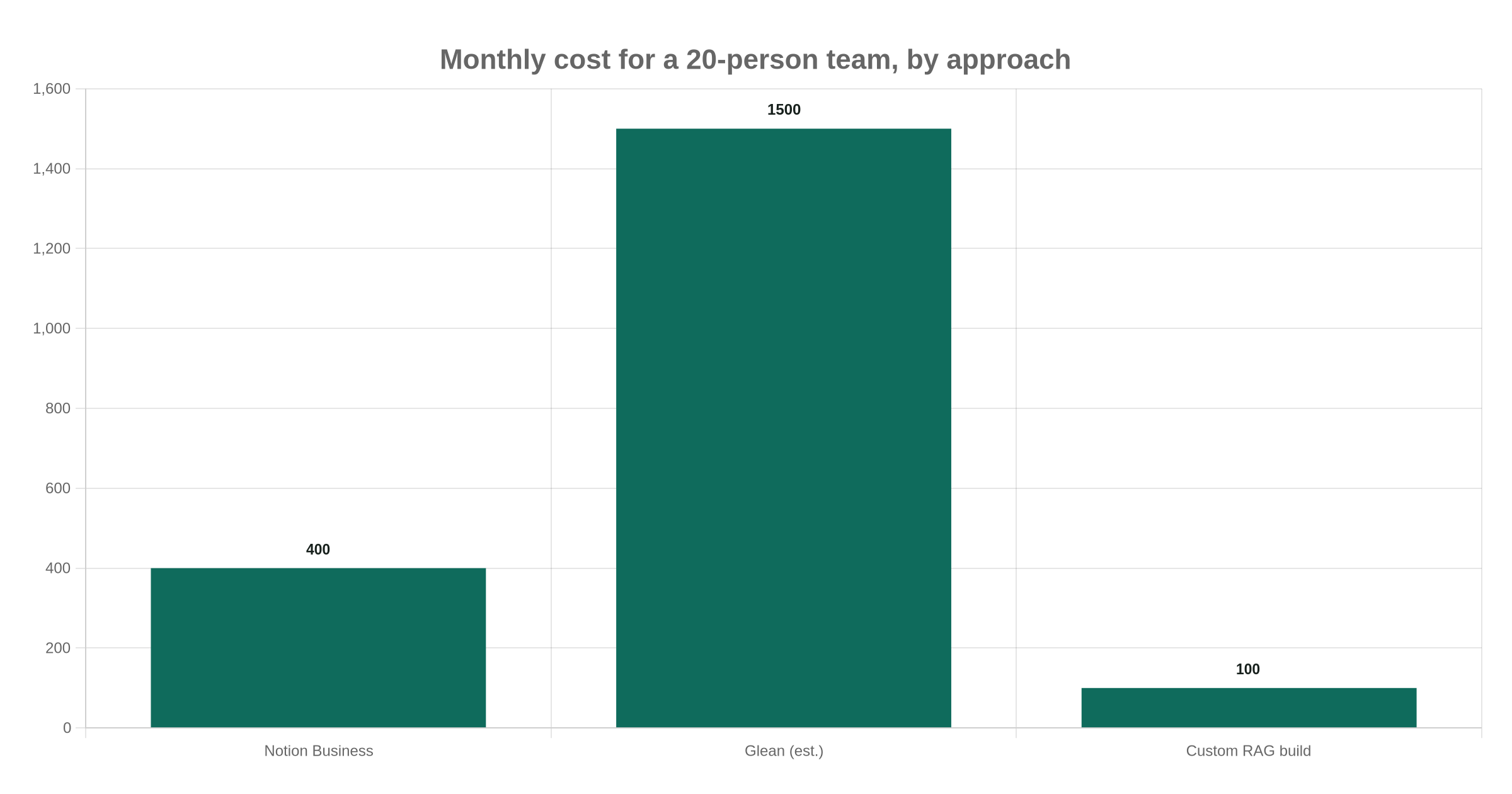
The custom column assumes a document set in the low thousands of pages: embedding it costs a few cents using a model like OpenAI's text-embedding-3-small at $0.02 per million tokens (OpenAI, 2026), and a managed vector database such as Pinecone covers that volume on its free tier or just above the $50-a-month Standard plan minimum (Pinecone, 2026). What the chart does not show is engineering time: a scoped custom build, from our own process, runs 1 to 4 weeks for an autonomous assistant once the documents are ready, against 24 to 48 hours to stand up a narrower single-purpose AI skill (TechFlow service timelines). That gap in setup time is exactly what the per-seat tools are selling you out of, at a recurring monthly price instead of a one-time build cost.
The crossover point is mostly a headcount question. At 20 people, Notion Business runs $400 a month against roughly $100 a month in infrastructure for a custom build, but the build still has to pay back its setup cost first. At 60 people, the same Notion plan runs $1,200 a month while the custom infrastructure cost barely moves, since a vector database's running cost tracks document volume, not headcount. Past roughly 40 to 50 users, the subscription model's linear per-seat pricing usually overtakes a one-time build cost within the first year, which is the point at which it is worth asking for a proper quote rather than defaulting to whichever tool the team already pays for.
Who Should Be Allowed to Ask It What?
Not everyone in the company should be able to ask an AI knowledge base about everything in the company, because an assistant that retrieves accurately is also an assistant that will accurately retrieve a salary spreadsheet for whoever happens to ask it the right question. Retrieval has no judgment about who is asking.
This is a named risk category, not a hypothetical one. The OWASP GenAI Top 10 lists excessive agency and sensitive information disclosure among the most common failure modes in deployed LLM systems, specifically the case where a model has broader access than the task in front of it requires (OWASP, 2025). A permission-aware retrieval setup, where the index checks what the asking user is allowed to see before returning a passage, is the fix, but it is extra engineering that an off-the-shelf tool may or may not support out of the box, and a quick demo rarely tests for it.

We will not wire a broad AI assistant to every company folder on day one. A role-scoped rollout, HR documents and signed contracts excluded until access control is verified working, costs about one extra week of setup and removes the single most common reason these projects get frozen by a client's own legal or finance team partway through. For a longer checklist of what we test before a launch, see our AI agent security checklist.
Picture a 25-person accounting firm rolling out an assistant over its client files. A junior staff member asking about a general filing deadline and a partner asking about a specific client's tax exposure both look, to an ungated retriever, like the same kind of question: find the closest matching passage and answer. Role-based access turns that into two different searches, one scoped to public filing guidance, one scoped to the client files that staff member is actually assigned to. Without that distinction, the assistant is not wrong about the facts; it is simply willing to hand anyone the facts it was never supposed to share.
Keeping an AI Knowledge Base Accurate After Launch
An AI knowledge base needs a standing maintenance habit after launch, not a one-time setup, because the moment a source document changes and the index does not, the assistant starts confidently repeating the old answer. A re-indexing cadence matched to how often each document type actually changes, weekly for a price list, quarterly for a policy manual, is the single highest-leverage maintenance decision a team makes.
Even a well-maintained index does not remove every error. Models tracked on the Vectara Hallucination Leaderboard, the industry's most cited benchmark, still add unsupported claims to between 1.8% and 24.2% of their outputs even when grounded in retrieved documents (Vectara, 2026), so a spot-check habit on anything cost- or compliance-sensitive still matters. This maintenance gap tracks a broader pattern documented in Cambodian SMEs specifically: organizational AI adoption trails individual usage, weakest on governance and process integration rather than on the technology itself (Gungor, Journal of Accounting, Finance, Economics, and Social Sciences, 2026). The tool rarely fails first. The weekly fifteen minutes nobody owns does.
A workable review habit does not need to be elaborate. A short weekly check, five flagged or low-confidence answers read by a human, catches drift before it becomes a pattern, and a quarterly pass through the full document set catches the slower kind of staleness, a policy that changed without anyone updating its source file. Neither step takes more than an hour a month once it is a standing habit rather than a reaction to a complaint, and both are cheaper, in staff time, than the forty minutes a confused team loses every time nobody can tell which version of a document is the current one.
That is the open question most Cambodian SMEs have not answered before they buy: not which tool, but who on the team owns re-indexing, who reviews a flagged wrong answer, and whether that person has the time this quarter. Our recommendation is to assign that owner in writing before the first document gets indexed, the same way a finance system needs someone responsible for reconciliation, not just someone who requested it.
If you are weighing an off-the-shelf tool against a custom build for your own document set, our AI agents work starts with a free 1 to 2 hour process-mapping audit, so we can tell you honestly which approach fits before quoting anything. Browse our project work, or request a scoped estimate once you know your document volume.
Prefer to chat? Message our founder directly on Telegram (@maxgrolier), or book a call with the team.