

Walk into almost any shop, cafe or mini-mart in Phnom Penh that sells online as well as over the counter, and the two sides of the business are almost always running on separate books. The POS system rings up the counter sale. The website runs its own stock count, updated by hand, usually once a day if it is updated at all. That gap is not a minor inconvenience. It is the single most common reason a small Cambodian seller oversells, online, a product that already sold out in the shop an hour earlier.
This guide is about choosing, or fixing, a POS system in Cambodia with that gap specifically in mind: not which machine has the nicest receipt printer or the cheapest monthly fee, but which one can actually keep a website's stock count honest. We build the ecommerce side of that pairing from Phnom Penh, so the question comes up on nearly every retail and F&B project brief we scope, and the honest answer is less reassuring than the marketing pages of most local POS vendors suggest.
What Does Syncing a POS System in Cambodia With an Online Store Actually Mean?
Syncing a POS system with an online store means the counter and the website read from, and write to, the same stock count, so a sale on either side updates the other without a person re-typing anything. In practice this happens through one of three patterns, and almost every Cambodia-facing retail or F&B business ends up on one of them, whether it chose to or not.
The first is manual export and import: a staff member pulls a spreadsheet or CSV from the POS at the end of the day and uploads it to the website's admin panel, or edits stock counts by hand. It costs nothing to set up and breaks the moment the business gets busy enough that end of day is too late. The second is a middleware bridge, a small automation (we build most of ours in n8n) that watches for a new sale or stock change in the POS, through whatever export or notification channel it actually offers, and pushes the equivalent update to the website's catalog. The third is a native commerce suite, a single platform where the point of sale and the online store are two faces of the same database, so there is nothing to bridge because there was never a separation to begin with.
The market behind that choice is bigger than it looks, and it is the same market we map in our wider ecommerce in Cambodia guide. Cambodia counted 753,679 registered enterprises as of August 2026 under the government's national startup and MSME strategy (Ministry of Industry, Science, Technology and Innovation, August 2026, reported by Kampuchea Thmey), and a meaningful share of them are exactly the single-location retail and F&B businesses this sync question is written for. Most sellers assume their POS falls into the third category because the vendor's pitch deck shows a shopping cart icon next to the register icon. Almost none of the systems sold in Cambodia actually do.
Why Doesn't Any POS Vendor in Cambodia Publish an API?
No major POS vendor selling in Cambodia publishes API or ecommerce-sync documentation on its own website. We checked the public product and pricing pages of POSCAMBODIA, CamboPOS, EZEPOS, MAQSU and WINTECH, the five names that come up first for anyone searching for a POS system in Cambodia. Every one lists hardware, offline mode, Khmer-language support and multi-branch reporting. None publishes an API reference, a webhook list, or a documented method for connecting the register to a website. MAQSU comes closest: its site names an "eCommerce" module alongside the POS module, but gives no detail on what that module actually synchronizes or how.
WINTECH's product page leans into daily operational control: fast barcode checkout, automatic stock deduction, low-stock alerts, X and Z closing reports. It also states, in one generic line, that "modern POS systems can integrate with accounting, inventory, and e-commerce platforms," without naming a platform or who builds the integration (WINTECH, Point of Sale product page, checked October 2026). That line captures the category's problem: integration as a bullet point, not a specification.
That gap is not an oversight. It reflects where the Cambodian retail market actually is: the counter, not the website, is still the primary sales channel for almost every business these vendors sell to, so sync is not a feature customers ask for loudly enough to document. For a seller who genuinely needs it, "does it sync with my website" cannot be answered from a vendor's marketing site. It has to be asked directly, in writing, before signing anything, because the answer a sales team gives on a call rarely survives contact with the actual integration.
The same blind spot shows up in how these vendors talk about their own hardware. A POS machine sold in Cambodia is typically priced and marketed purely as a till, a printer and a drawer, with the software bundled as an afterthought rather than as the integration layer a growing online seller actually needs.
What a Week Without Sync Actually Costs a Small Online Seller
A week without sync costs a small Cambodian seller in two currencies: lost sales from overselling, and staff hours spent reconciling two separate stock counts by hand. Take a hypothetical but realistic case: a Phnom Penh boutique with 240 SKUs, a counter running CamboPOS, and a WooCommerce storefront updated once a day by whoever closes the shop. If the shop sells the last unit of a popular item at 2pm and the website is not updated until closing, every online order placed for that item between 2pm and close is a sale the business has to apologize for and refund, a cost that is small per incident and compounds over a month of near-daily stockouts on fast-moving items.
A cafe with a delivery menu on Facebook and a separate online ordering page runs into the same problem from the other direction: the website shows an item as available because nobody marked it out of stock after the kitchen ran out mid-shift, and the order gets accepted, cooked as far as it can be, then cancelled with an apology. It is a smaller loss per incident than a retail stockout, usually just the ingredients and the staff time on a cancelled order, but it repeats daily rather than weekly, which is what actually erodes a delivery customer's trust in the ordering page.
A pharmacy taking refill requests over Facebook Messenger runs into a sharper version of the same gap. Its counter till, a basic system bought purely for barcode speed, tracks the shelf accurately enough for walk-in sales, but has no online side at all, so a staff member has to physically check stock before confirming a customer's message that a maintenance medication is available. When the counter gets busy, that check is the first thing to slip, and the customer finds out the promise was wrong only after a delivery rider has already been arranged. For a boutique or a cafe, the failure behind a sync gap is a refund. For a pharmacy, it is a patient going without a dose for a day, which is exactly why a till bought for counter speed alone is the wrong fit the moment a shop starts taking stock-dependent orders through chat, no matter how fast it scans a barcode.
The staff-hours side is less visible but larger. Reconciling two stock counts by hand for 240 SKUs typically takes a staff member 30 to 45 minutes a day once the catalog is established, more during a promotion or a new collection launch. At even a modest 20 dollars a day in staff time, across the roughly 300 days a year most of these shops open, that is 5,000 to 6,000 dollars a year spent keeping two numbers agreeing with each other, a cost that exists purely because the two systems do not talk, not because the business grew. None of that shows up on an invoice, which is exactly why it gets tolerated for years longer than it should.
Which POS Systems in Cambodia Can Actually Export Clean Data?
The POS systems in Cambodia worth considering for a growing online seller are the ones that let a business export its full sales, stock and customer data without restriction, because a system that will not hand back your own history is not a system you actually control. A September 2026 comparison of buy-versus-build POS options in Cambodia put it plainly: if a system will not export your sales and customer data in full, you are effectively renting your own business history back from the vendor (Kodenique Tech, POS system Cambodia buy versus build comparison, September 2026). That single question, can I export everything, filters out more bad options than any feature checklist.
Among the Cambodian vendors we reviewed, CamboPOS and MAQSU both publish cloud-based reporting that a business can reach from outside the till, which at minimum makes a nightly CSV pull workable. POSCAMBODIA and EZEPOS focus their public materials on the till experience itself (receipts, kitchen display, barcode scanning) and say nothing publicly about data portability, so the honest move is to ask for a sample export before paying anything, not after.
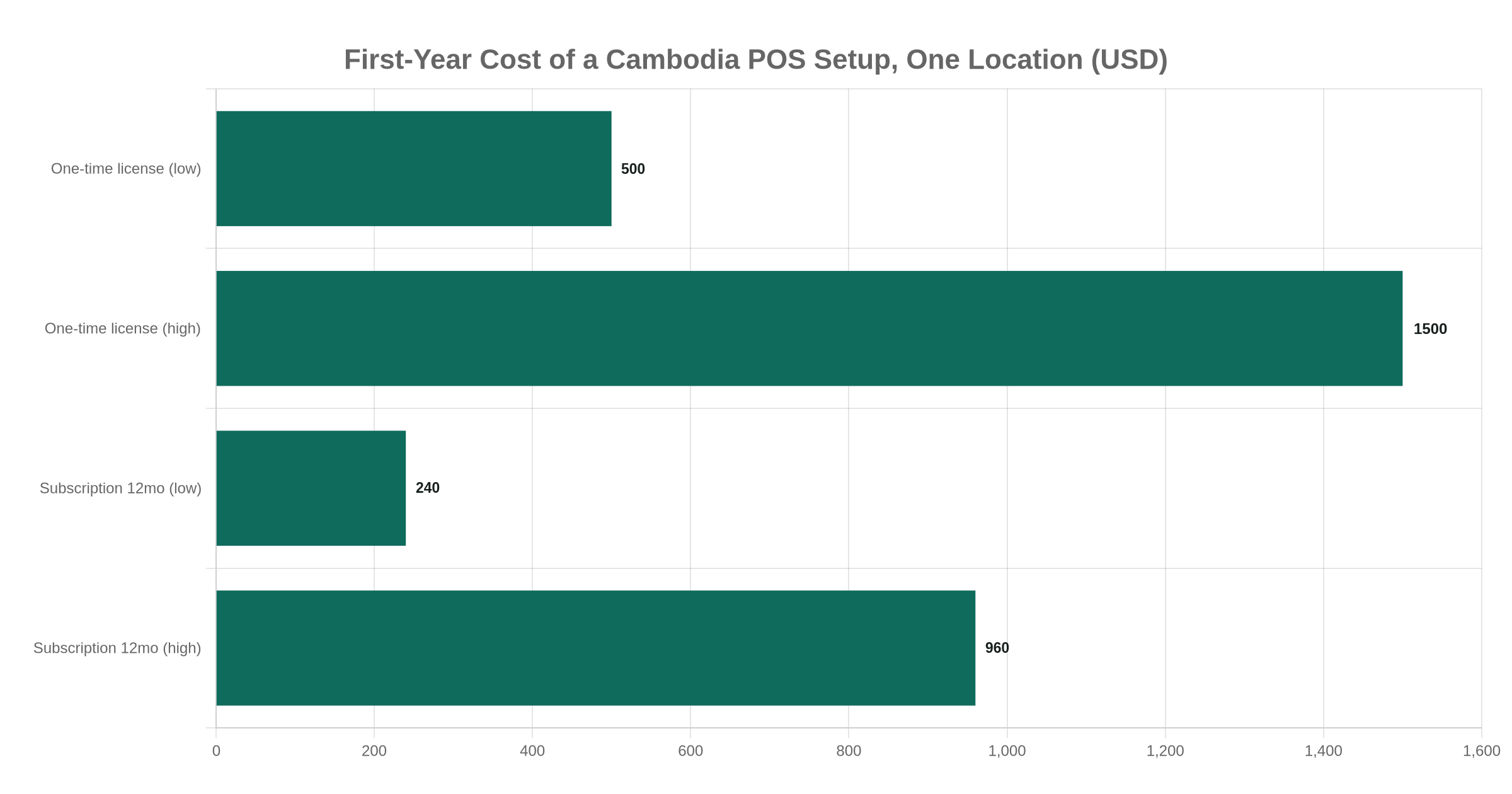
Price is a second filter, and the two models behave differently. Cambodian POS vendors generally sell either a one-time license, roughly 500 to 1,500 dollars depending on the hardware bundle, or a monthly subscription of about 20 to 80 dollars per terminal, which costs more over three years but keeps upgrades and support included (Kodenique Tech, September 2026). Point Hub, one of the newer cloud entrants, prices annually instead: 99, 159 or 259 dollars a year for its Starter, Standard and Premium tiers (Point Hub POS, pricing page, checked October 2026). None of the three pricing models says anything about export rights on its own, which is exactly why that question has to be asked separately, in writing, before the contract is signed.
Odoo Is the Only POS Here With a Public, Native Ecommerce Sync
Odoo is the only point-of-sale option we would call genuinely synced with an online store out of the box, because its own documentation describes POS and website inventory as one shared record rather than two systems that need connecting. Odoo's own product page states that a sale rung up at the register keeps stock levels accurate in real time, and that selling online and in-store happens with "synchronized inventory, pricing, and customer data" because both channels write to the same backend (Odoo, Point of Sale feature page, checked October 2026).
It also handles the offline problem Cambodia's power and internet reliability makes unavoidable: 42.8 percent of Cambodian businesses reported at least one electricity outage in the World Bank's 2023 Enterprise Survey (World Bank Enterprise Surveys, 2023 round, cited by CEIC Data). A POS session can close offline without losing data, and orders sync automatically once the connection returns, according to the same Odoo page.
This is the first opinion we will defend on nearly every retail-plus-ecommerce brief: when a Cambodian seller genuinely needs two-way, real-time sync between a counter and a website, and not just a nightly approximation, Odoo is the only system in this market that documents that sync as a built-in feature rather than something we would have to build and document ourselves. Odoo sits in the stack we already deploy for clients who need a connected back office, alongside n8n for the automations that sit around it, which is why we reach for it first rather than promising a custom sync layer bolted onto a Cambodian POS vendor's closed system.
It is not free of trade-offs. Odoo asks a business to run its till on a browser-based terminal rather than the familiar standalone hardware most Cambodian shop staff already know, and it asks the business to commit to Odoo's own catalog and pricing structure rather than keeping the simpler, cheaper local system it already trusts. For a single-location shop doing a handful of online orders a week, that trade is rarely worth making yet.
Can You Just Use Shopify's Own POS Hardware in Cambodia?
Shopify's own point-of-sale hardware and software cannot be set up for a business registered in Cambodia, because Shopify POS is restricted to the same country list where Shopify Payments operates in person, and Cambodia is not on it. Shopify's Help Center lists 18 countries and territories where Shopify Payments supports in-person processing for POS, including Singapore as the only Southeast Asian market, alongside Australia, Canada, the United Kingdom, the United States and a run of European countries (Shopify Help Center, checked October 2026). That mirrors the restriction we have already documented for Shopify checkout in Cambodia: the storefront software runs anywhere, but the country list that unlocks Shopify's own payment processing, online or in person, has never included Cambodia.
A Cambodia-based seller already running a Shopify storefront can still sell in person, just not through Shopify's own POS hardware and app. The workaround is the same one that applies at checkout: a separate card or KHQR terminal handling the in-person sale, with stock levels reconciled back into Shopify by hand or through a middleware bridge, because Shopify's native POS simply will not activate for a Cambodian merchant account. That gap is exactly why the webhook bridge covered next is worth building: it is the difference between a Shopify storefront that quietly drifts out of sync with the counter and one that does not.
The Realistic Middle Path: a Webhook Bridge Between Counter and Website
The realistic middle path for most Cambodian sellers is a webhook bridge that reads whatever export or notification the existing POS already offers and pushes it to the website automatically, without replacing a till the staff already know how to use. Most of the local POS vendors we reviewed already produce something a bridge can read: CamboPOS's standard software already emails and sends Telegram reports of daily sales, independent of its separate cloud-based Web Report Module (cambopos.com, pricing page, checked October 2026), MAQSU exposes stock and sales data to its own reporting app, and even systems with no documented API usually export a CSV a script can poll on a schedule. A middleware tool such as n8n can watch that export, a shared folder, an inbox or a reporting endpoint, and translate it into a stock update on a WooCommerce, Shopify or custom storefront every few minutes instead of once a day.
This is the second opinion we would defend over a platform swap in most cases: a business that already trusts its counter POS does not need to replace it to fix the sync gap, it needs a bridge built around the export that system already produces. Replacing a POS staff already know, mid-season, to chase a sync feature is usually a worse trade than building a two to four week automation around the system already in place, and it is the option we default to unless a client is already planning a bigger platform change for other reasons.
The first thing we check before scoping that automation, before writing a single workflow step, is whether the two sides even key stock the same way. A POS that identifies a product by an internal numeric code and a storefront that keys the same product by a barcode or a SKU string look compatible until the first mismatched product silently fails to update. Building that mapping table is usually the actual work; the webhook or polling step that moves the data across is the easy half. A "two to four week" estimate that turns into six is almost always this, not the automation itself.
The trade-off is reliability, not cost. A bridge is only as current as its polling interval and only as resilient as the export it reads, so if the POS changes its report format or the export silently stops, the bridge fails silently too, usually discovered only when a customer orders something that is no longer in stock.
How Do KHQR and ABA PayWay Fit Into a Synced POS Setup?
KHQR and ABA PayWay fit into a synced POS setup as the payment layer underneath the inventory sync, and the two are easy to confuse because both can generate a QR code at the counter. Over 4.5 million merchants across Cambodia already accept KHQR (fintechcambodia.net, 2025 data), and Bakong, the National Bank of Cambodia's settlement system behind it, moved 1.325 billion transactions worth roughly 224 billion dollars in 2025 (National Bank of Cambodia data, reported by Kiripost and Cambodianess, January 2026). What most counter staff actually use day to day, though, is a static QR code printed once and taped to the register, which carries no order amount and confirms nothing automatically. That is fine for a till. It is the wrong object for a checkout page, which needs a fresh, order-specific code and an automatic confirmation the moment it is paid, the distinction we cover in full in our KHQR integration guide.
A POS and a website can share the same payment rail without sharing the same QR mechanism. ABA PayWay, for instance, became Cambodia's first payment gateway on the Shopify App Store in October 2025, and the first from a Cambodian bank (Cambodia Investment Review, October 2025), and issues both a counter-side KHQR option through participating POS hardware and a website-side API or plugin for checkout pages, with refund handling that behaves differently on each side, a gap we have documented separately in our ABA PayWay guide. The practical rule for a synced setup: treat the payment integration as a second project alongside the stock sync, not a detail the POS vendor will quietly handle for you.
What to Check Before You Buy: a Short List for This Week
None of this requires picking a side between replacing everything and living with the gap forever. Most Cambodian sellers land somewhere in the middle: keep the POS staff already trust, and build the bridge, or the ecommerce development project, that actually closes the gap between the counter and the website. If the honest answer to the questions below is "we don't know," a scoped estimate from an ecommerce development team that has already mapped these systems is a faster way to find out than guessing through another quarter of manual reconciliation.
- Ask for a sample data export before paying anything. If the vendor cannot hand over a real CSV of sales and stock on request, assume it never will.
- Ask specifically about API or webhook access, in writing. A verbal "yes, it integrates" from a sales call is not a specification.
- Check whether KHQR is dynamic or static on that system. A static counter code cannot confirm an online order.
- Price both models over three years, not month one. A 1,500 dollar one-time license and an 80 dollar monthly subscription cross over in roughly 19 months.
- Decide whether you are buying a POS or a bridge. If the real need is sync, not a new till, a webhook bridge around the current system is usually the faster, cheaper fix.
- Plan for the connection dropping, not just the power. Whatever sync pattern is chosen needs an offline or retry behavior, not just a happy-path demo.
Prefer to chat? Message our founder directly on Telegram (@maxgrolier), or book a call with the team.